

Google’s WebMCP Goes Live in Chrome 149: How Websites Will Talk to AI Agents
I have been waiting for a moment like this. Google’s WebMCP enters its public origin trial in Chrome 149 on June 2, 2026, and it changes how AI agents work inside your browser. Here is what launched, why it matters, and what you can do with it now.
WebMCP is an open web standard, announced at Google I/O 2026, that lets websites expose structured tools to in-browser AI agents. Its experimental origin trial opens in Chrome 149 on June 2, 2026.
What Is WebMCP, in Plain English
WebMCP lets a website tell an AI agent exactly what it can do, instead of forcing the agent to guess. Google introduced it at I/O 2026 as a proposed open web standard that lets sites expose JavaScript functions and HTML forms as structured tools that browser-based AI agents can invoke directly.
The name stands for Web Model Context Protocol. Think of it as a menu. The site lists its actions, search, checkout, book a flight, file a ticket, and the agent orders from that menu through a clean interface. The browser handles the rest.
Why This Matters Right Now
For about two years, AI agents have “browsed” the web in a clumsy way. An agent loading a page has to read pixels and DOM nodes, guess what the UI is, plan a click sequence, hope nothing shifts, and pray the form submits. It looks fine in a demo. It breaks in production.
WebMCP flips the model. Rather than having an agent simulate human clicks through a website, WebMCP enables it to call machine-friendly functions to complete tasks with greater reliability and speed. The payoff for you is real: Google Chrome is getting a major upgrade that lets websites talk directly to AI agents, making online booking, shopping, and research much faster and more reliable. Anyone tracking the rise of AI assistant apps in 2026 should see WebMCP as the plumbing that makes those assistants actually useful.
How Developers Use WebMCP: Two Paths
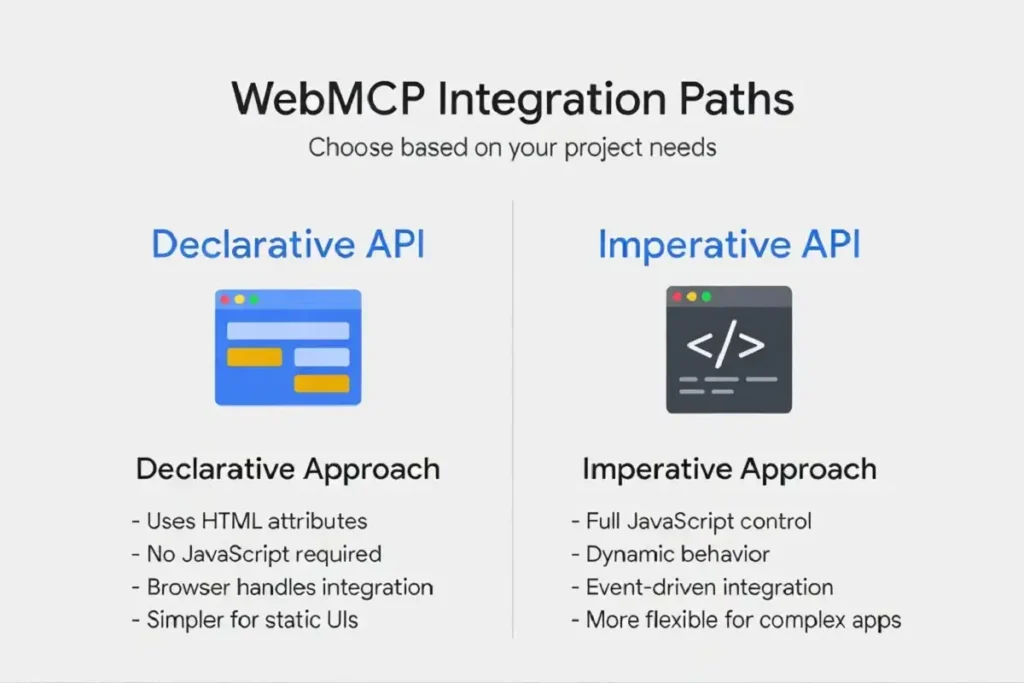
WebMCP ships with two ways to add support, and the easier one takes minutes.
The declarative API is for simple cases. You annotate an existing HTML form with a few attributes, and the browser builds the tool schema for you. No JavaScript required. A search form gets a and a short description, and it becomes a typed, discoverable tool an agent can call.
The imperative API handles harder cases: dynamic data, multi-step flows, stateful operations. You register tools in code through. A feature check keeps things safe in browsers that do not support WebMCP yet. The tools simply do not register, and nothing breaks.
WebMCP Is Not the Same as MCP
WebMCP is a complement to MCP, not a replacement. The difference comes down to where each one runs.
Server-side MCP lives outside the browser, with its own process, infrastructure, and authentication. WebMCP runs inside the browser tab. That means it can use the user’s live session, cookies, and current page state. No extra sign-ins. No API keys to juggle. The practical split is straightforward: use MCP for backend and headless agent work, and use WebMCP for actions inside a page where the user is already logged in.
Where Things Actually Stand
Support is early, and the browser picture is mixed. Microsoft co-authored the spec and shipped Edge 147 support in March 2026. That gives WebMCP two major browser makers behind it. The gaps are real, though. Firefox and Safari have made no commitments, and Anthropic’s 2026 MCP roadmap doesn’t mention WebMCP.
The spec is not ratified yet either. The spec lives in the W3C Web Machine Learning Community Group, not yet on the W3C official Standards Track. Still, scale is on Google’s side. Chrome holds roughly 65% browser market share, Edge adds another 5%, and a pattern supported by 70% of browsers backed by both Google and Microsoft is not a niche bet. You can read the full proposal and API details in Chrome’s WebMCP documentation for developers.
This launch fits a wider pattern of browser-based AI agents reshaping daily tasks, and it lands the same week other major Chrome AI updates from Google I/O reached users.
What You Can Do Before Chrome 149 Lands
You do not need to wait for June 2 to start. Right now, WebMCP is available in Chrome 146 Canary behind the “WebMCP for testing” flag at chrome://flags.
Map your site’s tool surface first. List the actions an agent would legitimately want: search, filter, submit, navigate. The declarative API is cheap enough that adding it before the trial costs almost nothing. For testing, enable the flag, install the Model Context Tool Inspector extension, and confirm your tools show up correctly. The tooling is rough at this stage, but the programming model is stable enough to build against. Developers watching how AI skills drive career growth in 2026 have a clear reason to learn this one early.
The Takeaway
WebMCP is infrastructure, not a feature. It answers a question every browser agent has been brute-forcing for years: how does an agent know what a page can do? Starting June 2, 2026, Chrome 149 gives that question a real answer. The standard still needs Firefox, Safari, and W3C sign-off to become truly universal. But with Google and Microsoft already shipping it across most of the browser market, the direction is set. If you build for the web, this is the moment to start mapping your tools.